Text-Message Exhibits from an RSMF Export
The chat or text-message export a review platform or collection tool wrote becomes a dated, searchable transcript with the export's hash on its first page, rendered in your browser, then stamped like any exhibit.
Prepare a message transcriptPreview every page free; the download is the step you pay for.
Read a prepared text-message exhibit
This fictional SMS exchange is Exhibit G in the Harbor Supply demonstration. The source-record page is PDF page 9, followed by the message ledger on page 10. The transcript preserves the export’s deleted-message marker, edit history and attachment reference.
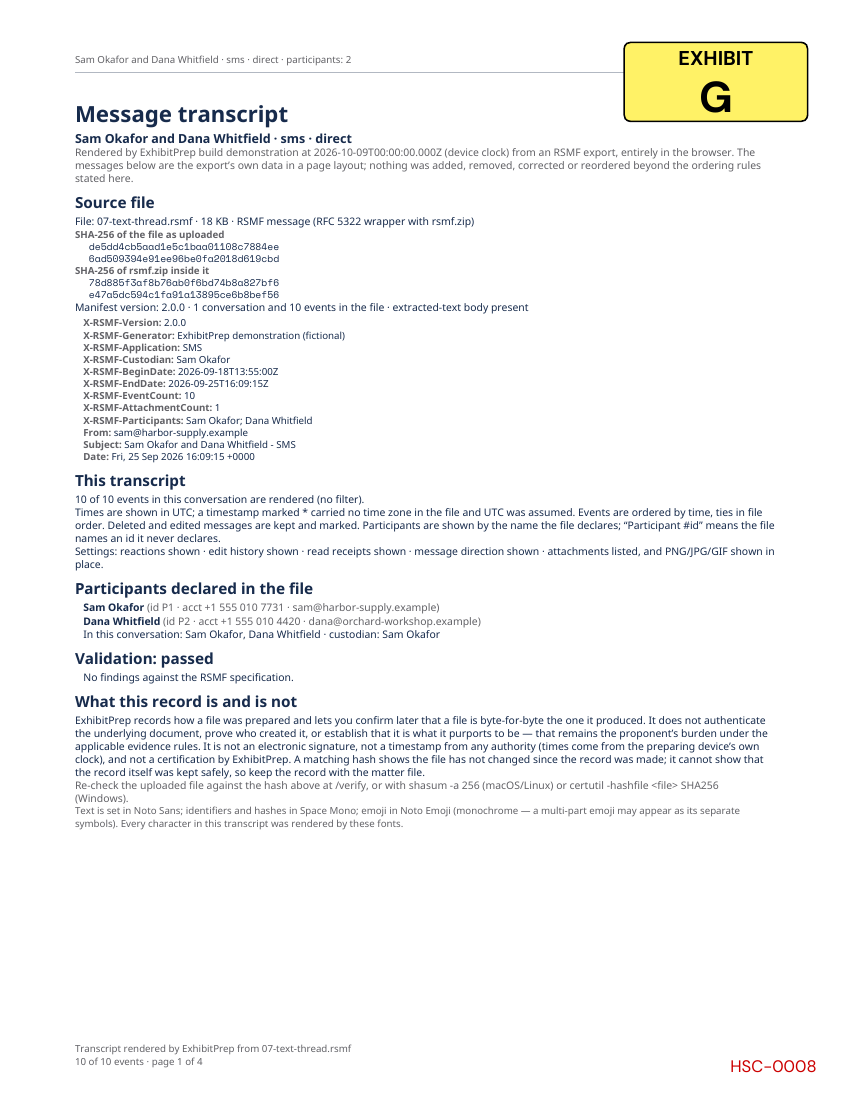
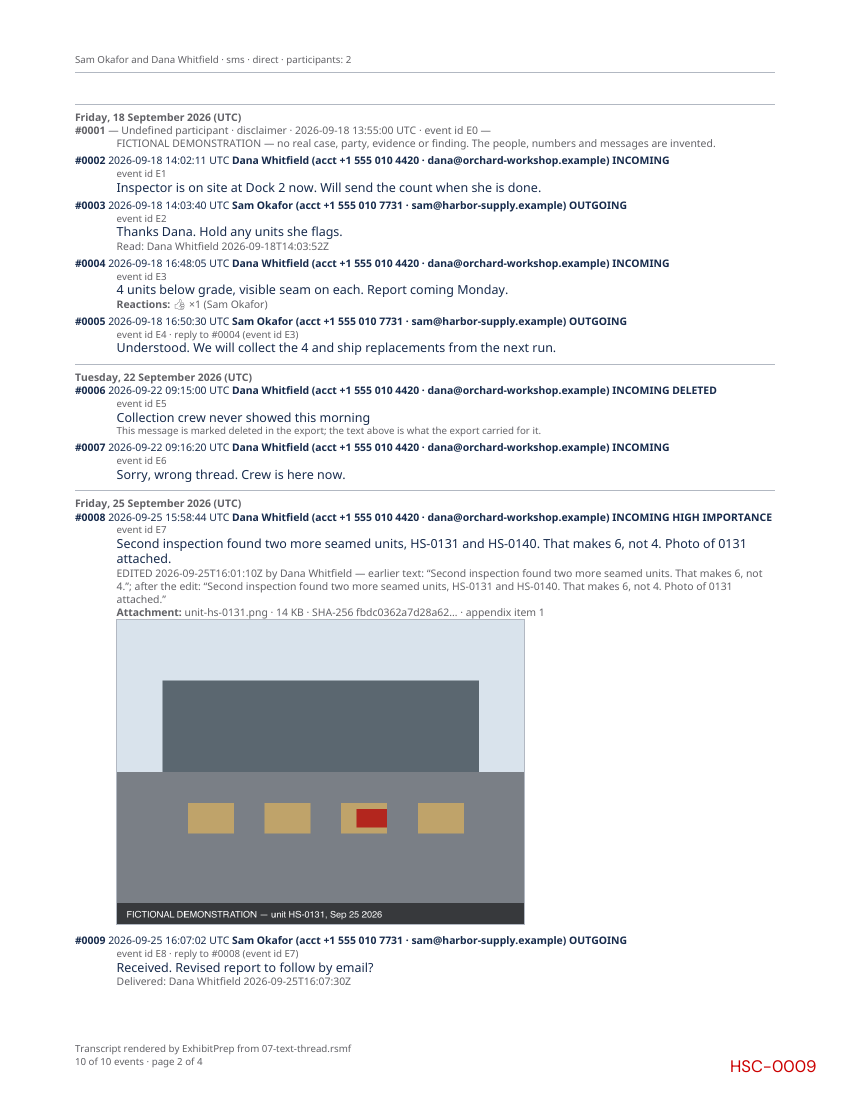
The people, messages and matter are fictional. This is a product example, not a record from a customer or a court acceptance decision.
- An RSMF file is an RFC 5322 message wrapping an rsmf.zip archive whose rsmf_manifest.json lists participants, conversations and events; ExhibitPrep reads RSMF 1.0 and 2.0 and a bare rsmf.zip.
- Each rendered conversation is one PDF: a source-record first page, a dated ledger of every event in the selected range, and an attachments appendix listing each attachment with its size and SHA-256.
- Every event row carries the full timestamp in UTC, the sender’s display name and account identifier, the manifest event id, and DELETED or EDITED markers with the earlier text; no message in the range is dropped.
- Relativity recommends at most 10,000 events per file; ExhibitPrep reads up to 20,000 and the intake panel estimates pages against the 500-page bundle limit before rendering.
- Events without a timestamp are shown first, an undeclared sender is shown as "Participant #id", and events naming an undeclared conversation form a reconstructed conversation, the same way Relativity’s Short Message Viewer labels them.
- The file is parsed, hashed and rendered in web workers on the device; the transcript fonts (Noto Sans, Space Mono, Noto Emoji) are fetched from this site and nothing else leaves the browser.
- Chinese, Japanese, Korean, Arabic, Hebrew and Indic text is shown as [U+XXXX] codes and the first page states how many characters were shown that way; the original text is unchanged in the source file.
- ExhibitPrep does not collect messages from a phone or an account, does not review or code them, and does not decide what they establish.
From export to exhibit
Step 1
Start with an existing RSMF export
Use a .rsmf file or a bare rsmf.zip from your collection or review workflow. ExhibitPrep renders the export you provide; it does not collect messages from a phone. If you already have a PDF transcript, add it as a PDF instead.
Step 2
Add the file to ExhibitPrep
Drop the .rsmf file with your PDFs. It is parsed in your browser: nothing is uploaded, and the file is checked against the RSMF specification.
Step 3
Choose what to render
The message intake panel lists the conversations with their counts and dates. Pick conversations, an optional UTC date range, which annotations to show, and whether images are shown in place.
Step 4
Review the transcript and stamp it
Each conversation becomes one PDF with a source-record first page. Preview every page free, set the exhibit label and placement, then download the stamped set.
What the transcript carries
Source record, page 1
The export’s SHA-256 and the SHA-256 of rsmf.zip, every X-RSMF header (generator, application, custodian, dates, counts), the participants the file declares, how many of the conversation’s events are rendered and the filter applied, the settings, the validation outcome and every finding.
The ledger
Every event in time order with a citable row number; day separators; undated events first; direction and importance as words; thread parents; reactions with their participants; read and delivery receipts; attachments with their hashes and PNG, JPG and GIF images in place.
What is marked, never hidden
A deleted message stays, marked DELETED. An edited message shows its history. A timestamp with no zone is marked with an asterisk. A reply whose parent is not in the file says so. A validator-failing file is rendered with each problem printed on page 1.
The appendix
Each attachment referenced by the transcript, by name, size and SHA-256, with the rows that carry it, so the original can be matched to the member inside rsmf.zip.
What ExhibitPrep does not do
- It does not collect messages from a phone, a backup or an account. Start from the RSMF file your collection or review tool wrote.
- It does not review, code, redact or search across a production. A review platform does that; ExhibitPrep is the step after it.
- It does not decide who sent a message or what it establishes. The transcript records what the export contains and how it was rendered; the questions the evidence rules ask remain the proponent’s to answer. See the help article for the rules commonly in play.
ExhibitPrep formats documents. It does not provide legal advice, submit filings, or determine whether evidence is admissible or a filing meets court requirements.
Text-message exhibit FAQs
What is an RSMF file?
RSMF (Relativity Short Message Format) is an open export format for chat and text-message evidence: an email-shaped wrapper around an rsmf.zip archive whose rsmf_manifest.json lists participants, conversations and every event with its timestamp, sender, text, reactions, edits and attachments. Relativity and Reveal export it; collection tools such as Hearsay, iMazing, Message Crawler and ChatExport write it from a phone, a backup or an account. ExhibitPrep reads RSMF 1.0 and 2.0 and a bare rsmf.zip.
What does the transcript show for each message?
A citable row number, the full timestamp in UTC (an asterisk marks a value that carried no time zone), the sender’s display name and account identifier, INCOMING or OUTGOING and HIGH IMPORTANCE as words, the manifest’s event id, the message it replies to, the text, DELETED and EDITED markers with the earlier text, reactions with who reacted, read and delivery receipts, and each attachment with its size and SHA-256. Deleted and edited messages are never dropped.
Can I render only part of a conversation?
Yes: choose a UTC date range in the intake panel. Every transcript states how many of the conversation’s events it carries and the range applied, on the first page and in every footer, so a slice is disclosed as a slice. Events without a timestamp are kept in every slice because they cannot be placed.
Does ExhibitPrep collect the messages from the phone?
No. ExhibitPrep starts from the RSMF file a collection or review tool has already written, and renders it into an exhibit in your browser. It does not collect, review or code messages, and it does not decide what they establish; the transcript’s first page records the export’s hash, its headers and the validation outcome so the proponent can answer those questions with the record in hand.
Can I start with screenshots or an existing PDF transcript?
Yes. Add PDFs or supported images to stamp them as documents. The message-transcript workflow described here starts with .rsmf or rsmf.zip and reads the participants, timestamps and events declared in that export. It does not reconstruct those records from screenshots.
Are the messages uploaded anywhere?
No. The file is parsed, hashed and rendered in web workers on your device, and the transcript fonts are the only thing fetched, from this site. The only analytics recorded are counts and booleans: how many conversations, events and attachments, never a name.